
Project Zomboid Server Hosting
Kick off your fight for survival on our uninterrupted infrastructure. Build 42 Ready, high RAM and single-core performance, and full Steam Workshop (Mod) integration.
- 5-10 min
- Automatic setup
- 16-32 GB
- RAM options
- Build 41 & 42
- Version support
- NVMe SSD
- High-speed storage
Maximum Zomboid Solutions
Surviving in cities overrun by zombie hordes (Louisville, West Point) and running heavy mod packs demands powerful hardware infrastructure. Our Project Zomboid server hosting service is delivered on high-speed NVMe SSD technology, optimized for Build 42 updates and engineered to eliminate the stuttering experienced during map transitions.
Instant Delivery
Automatic setup in 5 minutes.
Sandbox Management
Manage all your settings from the panel.
Mod Support
Install Steam Workshop mods with one click.
DDoS Protection
Hardware-based DDoS protection.
Zomboid Packages
Transparent pricing, uninterrupted survival! Professional packages that go live instantly.
PZ Basic
For small groups of friends (2-6 players).
- 4 Cores (Xeon)
- 16 GB RAM
- 20 GB NVMe SSD Disk
- Build 41 & 42 Support
- DDoS Protection (Free)
- Steam Workshop Mod Support
- Web Panel for Easy Management
PZ Performance
For large RP servers and heavy mod packs.
- 4 Cores (Ryzen 7/9)Performance packages run on AMD Ryzen 9 class processors. Subject to availability, delivery may be on a Ryzen 7 class processor. Both classes provide high single-core performance.
- 24 GB RAM
- 40 GB NVMe SSD Disk
- Build 41 & 42 Support
- DDoS Protection (Free)
- Steam Workshop Mod Support
- Web Panel for Easy Management
PZ Extreme
For high-population community servers.
- 6 Cores (Ryzen 7/9)Performance packages run on AMD Ryzen 9 class processors. Subject to availability, delivery may be on a Ryzen 7 class processor. Both classes provide high single-core performance.
- 32 GB RAM
- 75 GB NVMe SSD Disk
- Build 41 & 42 Support
- DDoS Protection (Free)
- Steam Workshop Mod Support
- Web Panel for Easy Management
Project Zomboid Server Hosting
If you want uninterrupted co-op survival with your friends, our Project Zomboid server hosting is built for exactly that. Our infrastructure keeps the bases you build across Knox County, your loot routes, and your character progression online 24/7, with full Steam Workshop mod support: manage and instantly activate hundreds of Build 42-compatible mods from a single panel.
Because Project Zomboid is Java-based, it depends heavily on single-core speed, which is why our performance plans use Ryzen processors so your tick rate stays stable even during massive zombie hordes. On top of that, hardware-level DDoS protection keeps your game running even while under attack.
What to Look for When Renting a Project Zomboid Server
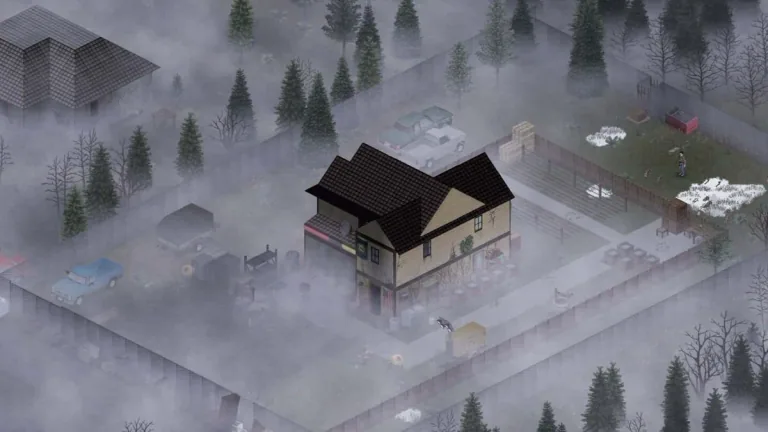
Project Zomboid has a very different load profile from most multiplayer games. The server keeps every zombie on the map, every vehicle, every item inside every container and the state of regions players have walked away from in memory. That is why single-core speed and RAM matter far more than the number of cores. A poorly sized plan will stutter the moment a horde gathers or someone enters a new area, even if the game itself is not lagging.
The checklist below covers what to verify before choosing a Project Zomboid server hosting plan. Every one of our plans was built with these points in mind.
Checklist
Single-core performance: The server side of the game runs mostly on one thread. A high clock speed is worth more than many slow cores.
Real RAM allocation: All of the plan’s RAM should go to the game. On our servers memory is sized automatically to the plan, so you never touch JVM flags.
NVMe SSD storage: The world is stored as thousands of small chunk files. On classic disks, map transitions and autosaves cause freezes.
Location and ping: If your players are in Turkey or nearby, a distant location adds noticeable delay to hit registration and driving.
DDoS protection: Public servers, especially PvP communities, get attacked regularly. Hardware protection keeps the server up during an attack.
Steam Workshop integration: Being able to enter Mod IDs and Workshop IDs in the panel means adding mods without editing files.
Sandbox and config access: Without direct access to the .ini and SandboxVars.lua files you cannot change zombie population, loot rates and similar rules.
Console and live logs: Reading the server console is the only way to diagnose mod conflicts and connection errors.
Branch selection: Staying on Build 41 or moving to Build 42 should be your decision; the panel should let you switch.
Technical support: A team that knows the game will spot a broken mod list within minutes of a “server won’t start” ticket.
How Much RAM for How Many Players?
RAM usage is driven more by mod load and explored area than by player count. A six-player server with 80 mods that has explored most of the map including Louisville needs more memory than a fifteen-player vanilla server. The table below reflects real usage we observe on our servers.
| Scenario | Players | Mod load | Recommended RAM | Plan |
|---|---|---|---|---|
| Friends, vanilla | 2-6 | 0-20 mods | 16 GB | PZ Basic |
| Friends, heavy modpack | 2-8 | 50+ mods, map mods | 24 GB | PZ Performance |
| Community / RP server | 10-20 | 30-80 mods | 24 GB | PZ Performance |
| Large community, Louisville active | 20-32+ | 80+ mods, multiple maps | 32 GB | PZ Extreme |
Your world is preserved when you move between plans; the extra RAM of a larger plan takes effect on the next restart.
Your Own PC or a Rented Zomboid Server?
Home PC or an empty VDS
- The server only runs while your computer is on; when you leave, your friends cannot play either.
- Home connections mean port forwarding, NAT and dynamic IP headaches.
- The game and the server share the same CPU, so both slow down when hordes grow.
- On an empty VDS, SteamCMD setup, Java tuning, mod folders and updates are all on you.
- A DDoS attack hits your home connection directly.
Rented Project Zomboid server
- Online 24/7; players join whenever they like and the world keeps moving.
- Delivered installed and ready to join minutes after payment.
- Mods, sandbox settings and restarts are handled from the web panel.
- Hardware DDoS protection and a Turkey location come as standard.
- When something breaks, you talk to a support team that knows the game.
If you need full operating system access, or want to run several games or a Discord bot on the same machine, our VDS servers are an option; if you only want to play Zomboid, a ready-made server is both cheaper and far less work.
The Most Commonly Changed Project Zomboid Server Settings
Two files define your server’s character: servername.ini (connection, player limit, mod list and other technical settings) and servername_SandboxVars.lua (zombie behaviour, loot, XP and other game rules). Both are reachable from the file manager in our web panel; changes apply on the next restart.
servername.ini
- PublicName and Password: The name shown in the server list and the join password. Without a password the server is open to everyone.
- MaxPlayers: How many players can be online at once. Pick a value that fits your plan’s RAM; see the table above.
- PVP and SafetySystem: Whether players can hurt each other and whether safety mode can be toggled.
- PauseEmpty: Whether the world pauses when nobody is online. When enabled, farming, zombie migration and food decay do not progress while the server is empty.
- SaveWorldEveryMinutes: Autosave interval. Too short causes disk-related stutter; 10-15 minutes is a balanced value.
- Mods and WorkshopItems: The Mod ID and Workshop ID lists respectively. Order determines load priority.
- Map: If you use map mods, their folder names go here, ahead of the Muldraugh, KY entry.
servername_SandboxVars.lua
- Zombie Lore: Speed, Strength, Toughness, Cognition and Transmission decide how dangerous zombies are.
- PopulationMultiplier and Respawn: Zombie density and how quickly cleared areas fill up again.
- Loot rarity and LootRespawn: Item abundance per category (food, weapons, medical) and whether containers refill.
- XP Multiplier and DayLength: Skill gain speed and how many real minutes one in-game day lasts.
- StartMonth, StartTime, ErosionSpeed: The season the world begins in and how fast nature reclaims the town.
Installing a Steam Workshop Mod in Four Steps
Get the mod’s Workshop ID and Mod ID.
The Workshop ID is the number in the Steam page URL; the Mod ID is listed in the mod description as “Mod ID:”. Some mods contain several Mod IDs, note all of them.
Add them in the panel.
In the Steam Workshop section of our web panel, enter the Workshop IDs and Mod IDs separated by semicolons. For map mods, update the Map line as well.
Check load order.
If a mod depends on another (library mods, for example), the dependency must appear earlier in the list.
Restart and watch the console.
Mods are downloaded on first start; large modpacks can take a few minutes. If you see a red error line in the console, remove the offending mod from the list and try again.
Players must subscribe to the same mods on Steam; when they connect, any missing mods are listed automatically and can be installed with one click.
Common Problems and Fix Guides
Server won’t start after adding mods: Usually a missing Mod ID or wrong dependency order.
Mod error and mod conflict guideVoice delay and stutter: Fixed through VOIP settings and server performance parameters.
Performance settings and voice lag guideOnly specific people should join: Keep the server closed with a whitelist and account registration.
Player registration and whitelist guideSandbox values are ignored: If the file name does not match the server name, the game falls back to defaults.
Server settings guideWant the mod steps with screenshots:
How to install mods on your server
Frequently Asked Questions
What you need to know about renting a Project Zomboid server.
Can I use Steam Workshop mods on my Project Zomboid server?
Yes, our Project Zomboid servers are 100% compatible with the Steam Workshop. Through our advanced panel you can easily install Brita’s Weapon Pack, vehicle mods, and map mods by adding the Mod ID and Workshop ID.
When is my service delivered?
Once your payment is approved, your Project Zomboid server is set up and activated within 5-10 minutes thanks to our fully automated system. Your management details are sent to your email address.
How do I configure the Project Zomboid Sandbox (server) settings?
Through our web management panel you can access the .ini and .lua configuration files to change all Sandbox details, including zombie population, loot rates, PVP settings, and the experience point (XP) multiplier.
Will there be lag on high-population servers or the Louisville map?
No. Because Project Zomboid is Java-based, it requires high RAM capacity and strong single-core performance. Since our servers are equipped with next-generation processors and NVMe SSDs, you won’t experience lag or desync issues during chunk (region) loading or intense zombie hordes.
How much RAM does my Project Zomboid server need?
Your needs depend on the player count and mod load. For small groups of 2-6 players, the PZ Basic package with 16 GB RAM is sufficient. For mid-sized communities and moderate mod packs, we recommend the PZ Performance package with 24 GB RAM. For high-population servers with heavy mod loads, you should choose the PZ Extreme package offering 32 GB RAM.
Where are your servers hosted?
Your Project Zomboid servers are hosted in our data centers in Turkey and Germany . During setup, your server is automatically placed on the most suitable available node.
How do I install Steam Workshop mods?
Mod installation is handled entirely through our web panel. Simply add the Workshop ID of the mod you want from the Steam Workshop and restart the server; the mods are downloaded and installed automatically. Mod support works flawlessly on current versions, including Build 42.
How many players can join my server at the same time?
You set the player limit yourself with the MaxPlayers setting; we do not impose a technical cap. For smooth play we recommend 6-8 players on PZ Basic, 16-20 on PZ Performance and 32 or more on PZ Extreme. The heavier the mod load, the fewer players the same RAM can carry.
Can I move my Build 41 server to Build 42?
Yes. You can switch the version branch from the panel or ask our support team to do it. Build 41 worlds are not compatible with Build 42, however, so you will need to start a new world. Make sure the mods you use have a published Build 42 version first.
Will my world be lost when I stop the server or nobody is playing?
No. The world files stay on disk; when the server restarts you continue where you left off. Whether the world keeps progressing while empty is up to you via the PauseEmpty setting.
Do I need a separate Steam account for the server?
No. The server files and Workshop mods are downloaded anonymously on our side; you do not need to create an extra account. Players simply need a copy of Project Zomboid purchased through Steam to connect.
Do I need to know how to edit files to add mods or change settings?
Not for the basics. Entering Mod IDs and Workshop IDs into the relevant panel fields is enough. For sandbox rules such as zombie population and loot rates you open SandboxVars.lua in the panel’s file manager and change the values; our step-by-step guides and support team are there to help.
Related Game Servers

Need a Fully Managed Server?
Don’t limit yourself to standard control panels. Discover our professional VDS solutions to freely manage your own operating system, establish remote desktop connections, and gain full Root/Administrator privileges.